Today’s story is a little note to self, something to remind me when I next hit the same issue.
At $DAYJOB I was just working on some Google Sheets-backed dashboards using Tableau, when the team hit the following error message:
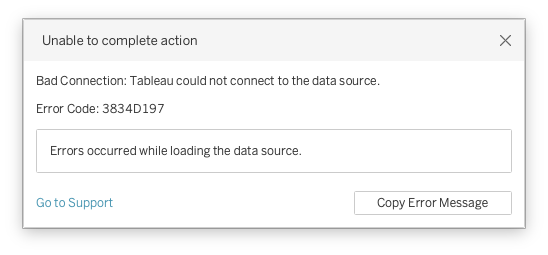
It says:
Unable to complete action
Bad Connection: Tableau could not connect to the data source.
Error Code: 3834D197
Errors occurred while loading the data source.
While debugging this, there were actually two aspects to take into account, that complicated things: one is the source of the error, and the other is Tableau’s behaviour when encountering the error. Both are good to keep in mind for future development.
Searching Tableau’s support didn’t yield much useful info: not that many people seem to have hit this issue, and when someone did, people were just guessing, and throwing things at the wall, see what sticks…
While trying to debug, managed to figure out that if I made a copy of the offending Google Sheet (spreadsheet), but removed one specific sheet (tab), then the data connection worked. On the other hand, when I removed the same tab from the original spreadsheet, and kept trying to connect, the error persisted…
Scrub Those Pivot Tables
First things first: what was missing in the copy compared to the original that allowed the connection to work?
Searching Tableau’s support didn’t yield much useful info: not that many people seem to have hit this issue, and when someone did, people were just guessing, and throwing things at the wall, see what sticks… Similar throwing stuff out happened on Reddit too.
Going through the suggestions, the first suspect was a chart, as the offending sheet had a waterfall chart near the top, but after a quick trial of whipping up a chart and connecting to Tableau (which worked), that hypothesis was refuted.
Buried in some of the other comments, however, there was a mention of pivot tables:
Was breaking my head over this error and as soon as I deleted the Pivot Table the error was fixed.
Checking for that, scrolling further down on our offending sheet (the one that we had to remove in the copy to make it work), there was indeed a pivot table.
For a test, creating a simple sheet with a pivot table in it, indeed I could trigger the error on demand, so this seems to be the proximate cause of our issue!
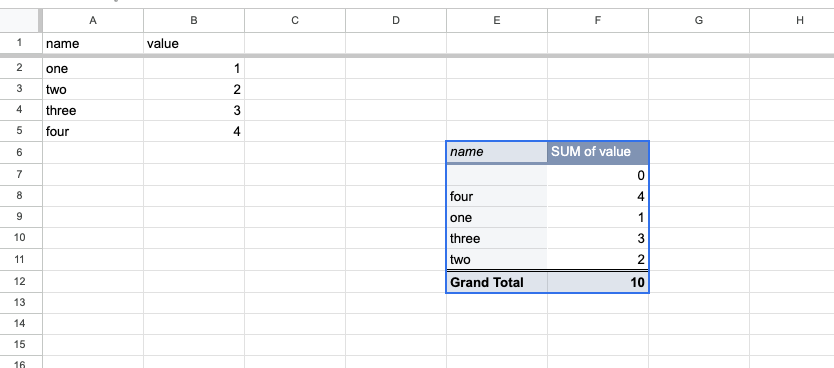
One lesson learned: Google Sheets1 that are connected to Tableau directly shouldn’t have pivot tables in it.
Restart Tableau to Try Again
But this was only half of the story. The nagging feeling remained, why did my modified copy of the spreadsheet work, but if I’ve fixed the original sheet (deleted the pivot table) still throw the error when I tried to reconnect?
I’ve downloaded both sheets (as xlsx) and tried to compare, but couldn’t really see any material differences… Is it in the history? Is it something more subtle that is hidden in the structure of the doc, or how Google exposes the spreadsheets over the network connection versus the downloaded files?
For simplicity, I tried things out with intentionally triggering this error with a simple sheet, then fixing it, and trying to re-add. The error was again showing even through the sheet no longer had any pivot table…
The breakthrough came when I shut down Tableau, started up again, loaded the fixed sheet — and then it worked.
Seems like Tableau caches something between the attempts of connecting to the sheet (either the whole content, which I would doubt, or just the connection results?), so when we hit an error loading the spreadsheet, that error on the same error persisted while the Tableau sesson was running. And not knowing about that caching, and because our original dashboard took a couple of minutes to click through various data connector access requests when started up, I obviously wasn’t starting fresh whenever we made a chage to the breaking sheet. So we were just banging our head on the wall, while changing stuff to see if things worked, but Tableau’s caching hid it from us that we’ve fixed stuff…
That was an hour or two well spent! The lesson will definitely remain: if you hit an error loading a connector, just restart Tableau before trying again.
And the developer experience corollary: for goodness sake make Dashboards that do not take 3-5 minutes to reconnect to all the sources whenever starting up2.